User Interfaces in Core
Overview
UI in Core includes all the 2D elements that can be used to build menus, notifications, dialogue boxes, and head's up display's (HUD's). Creating UI Elements is mostly a drag-and-drop process, where any UI element added to the scene
Client-Server Communication
UI Elements can only be accessed by client-side Scripts. This means that for UI interactions to affect Networked objects, or have other in-game effects that are not strictly client-side, it is necessary to create Event Broadcasts to communicate between server and client. See the Events namespace for more information and examples.
UI Container Types
UI Containers have a Content Type which allow creators to specify the way the UI works and optimize performance. By default, UI Containers will haver the Dynamic type, but can be made more performant by changing their type to Static in instances where they do not need to move.
UI Type Definitions
- Static: Used for any UI that does not need to move.
- Dynamic: Used for any UI that will move.
- Texture: For extremely complex UI with many elements to be rendered as a single texture, like Minimap UI.
Texture Content Type
The Texture Content Type has greater cost than the other UI Container Content Types, but this cost is fixed. It is recommended to only use one Texture per project.
UI Properties
UI Control Properties
UIControl is the parent of all UI elements, and these properties apply to almost all UI elements in Core.
| Property | Definition |
|---|---|
| X and Y Offset | The distance from the anchor origin that the UI widget will display |
| Width and Height | Size of this UI element |
| Rotation Angle | Rotation angle using the anchor point as the pivot |
| Inherit Parent Width and Height | Whether the widget stretches in size to fit the transformations of the parent |
| Adjust Self Size to Inherited Size | When the Inherit Parent Size boxes is checked on, adds the dimensions on this UI element to the dimensions of the parent element |
| Anchor | Which corner, edge, or center the element is the origin, for positioning and rotation |
| Dock | Which corner, edge, or center of the parent the anchor is relative to. |
UI Text Box Properties
UI Text Boxes can have different colors, fonts and display options, depending on the space they need to occupy.
| Property | Definition |
|---|---|
| Text | The string of text that gets displayed |
| Color | The color of the font |
| Size | The size of the font |
| Font | The typeface used for the text |
| Justification | the alignment of the text within the text box |
| Wrap Text | Whether or not the text starts on a new line when it exceeds the width of the box |
| Clip Text | Whether or not text that exceeds the box size will be hidden. |
UI Text Fonts
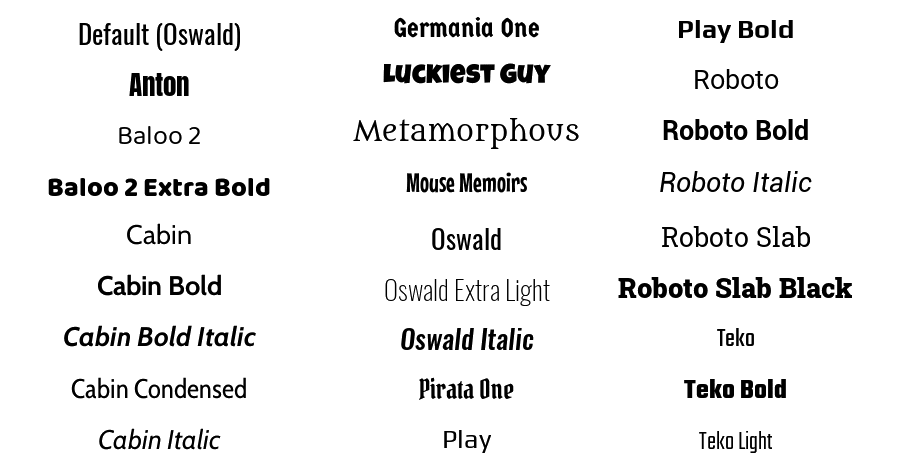
Change a Font on UI Text
Like Materials on static mesh objects, there are two ways to change the font of UI text, either by dragging from the Fonts section of Core Content or by selecting from the Property Window, and double-clicking the icon in the Font property.